Technical SEO for B2B: A Practical Guide
Technical SEO is the part of SEO that most B2B marketers ignore until something breaks. It covers the infrastructure of your website: how search engines access it, read it, and decide whether to show it in results. Content strategy, keyword targeting, and link building all depend on this foundation working properly.
Around 25% of websites have significant crawlability issues caused by poor internal linking, robots.txt errors, or site architecture problems. On large B2B sites with hundreds of pages, the problem is worse: 30 to 40% of content often goes unindexed because of crawl budget limitations or technical barriers. Every unindexed page is invisible in search, regardless of how good its content is.
This guide covers every component of technical SEO relevant to B2B websites: crawlability, site architecture, Core Web Vitals, structured data, and how to audit your site. It's one of the three specialist guides in this cluster. For the full strategic picture, see B2B SEO Strategy.
What Technical SEO Actually Covers
Technical SEO is sometimes described as "behind-the-scenes" work, but that framing underestimates it. It is the layer that determines whether any of your other SEO investments pay off.
Google's John Mueller put it plainly: "Consistency is the biggest technical SEO factor." That means signals must align across your entire site: links pointing to the same URL versions, canonical tags matching your navigation, and structured data matching visible page content. Inconsistency confuses crawlers and dilutes your authority.
Technical SEO covers six main areas:
- Crawlability: whether search engines can access your pages
- Indexing: whether those pages are stored and eligible to appear in results
- Site architecture: how your pages connect and how authority flows between them
- Core Web Vitals: Google's performance metrics for page speed and stability
- Structured data: machine-readable markup that helps search engines interpret your content
- Security: HTTPS implementation and mixed content issues
Each area affects the others. A slow site burns crawl budget. Poor architecture leaves pages orphaned. Missing schema means search engines guess at your content type. Fix one area without addressing the others, and you leave value on the table.
B2B Website Crawlability
Crawlability is the starting point. If search engines cannot access your pages, nothing else matters.
Googlebot and Crawl Budget
Googlebot follows links to discover pages, then returns to index them. This happens within a crawl budget: a limit on how many pages Googlebot will crawl on your site within a given time window. Large B2B websites with thousands of pages, extensive case study libraries, or multiple service categories are most at risk of crawl budget problems. When the budget runs out, newer or lower-priority pages go uncrawled.
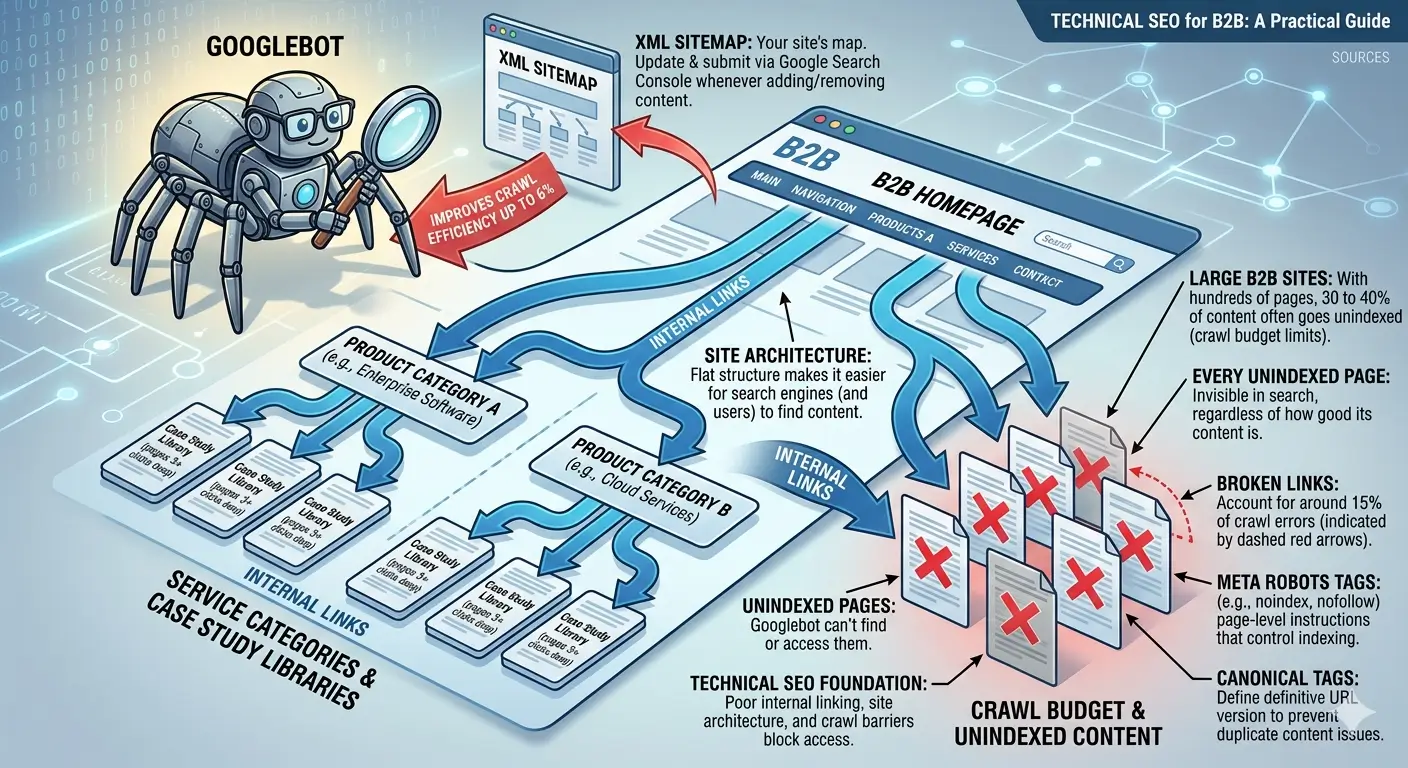
Broken links account for around 15% of crawl errors. Optimised XML sitemaps can improve crawling efficiency by up to 6%. Both are easy to address and should be standard maintenance.
The Key Files and Settings That Control Crawlability
- robots.txt: tells search engines which pages to access and which to skip. A misconfigured robots.txt can accidentally block entire sections of your site. Check yours at yourdomain.com/robots.txt.
- XML sitemap: gives search engines a map of your site's important pages. Submit it through Google Search Console and update it whenever you add or remove content.
- Canonical tags: tell search engines which URL is the definitive version of a page. This prevents duplicate content issues when the same page is accessible at multiple URLs.
- Meta robots tags: page-level instructions that control indexing (noindex, nofollow) independently of robots.txt.
For sites with more than 10,000 pages, log file analysis is worth the effort. Server logs show how Googlebot actually crawls your site: which pages it visits, how often, and how long it takes. Tools like Screaming Frog Log File Analyser process these logs and surface patterns you cannot see in Google Search Console alone. The gap between how you think Googlebot crawls your site and how it actually does is often larger than expected.
Site Architecture for B2B
Site architecture determines how your pages connect and how authority distributes across your site. A well-structured site makes it easier for both users and search engines to find content.
The core principle is the flat structure: important pages should be reachable within three clicks of the homepage. This maximises crawl efficiency and ensures link equity reaches your most valuable pages. Deeply nested pages (five or six clicks from the homepage) often receive little crawl attention and rank poorly.
For B2B sites with complex product lines, service categories, or geographic coverage, maintaining a flat structure requires deliberate planning. A common mistake is letting the navigation grow organically as the business adds pages, creating a deep and tangled structure that is hard to crawl and harder for visitors to navigate.
Internal linking is the mechanism that makes your architecture work. Descriptive anchor text helps search engines understand what the linked page is about. Breadcrumb navigation with schema markup improves both crawlability and user experience. Content hub structures (a pillar page with topic cluster articles) signal topical authority and keep related content connected.
Core Web Vitals for B2B
Core Web Vitals are Google's three metrics for measuring page experience. They became a ranking factor in 2021. As of January 2026, 56% of desktop pages and 48% of mobile pages achieve good Core Web Vitals scores, meaning roughly half of websites still fail at least one metric.
The Three Metrics
- LCP (Largest Contentful Paint): measures how long the main content of a page takes to become visible. Good: under 2.5 seconds. Poor: over 4 seconds.
- INP (Interaction to Next Paint): measures responsiveness across all user interactions during a session. Good: under 200ms. Poor: over 500ms. INP replaced First Input Delay in March 2024.
- CLS (Cumulative Layout Shift): measures visual stability, specifically how much the page layout shifts unexpectedly during load. Good: under 0.1. Poor: over 0.25.
Research from Backlinko found that pages in position one are 10% more likely to pass Core Web Vitals than pages in position nine. Pages failing Core Web Vitals show 3.7 percentage points worse visibility. Google's Gary Illyes has confirmed Core Web Vitals is more than a tiebreaker, but it does not replace relevance: it provides a competitive edge when other ranking factors are close.
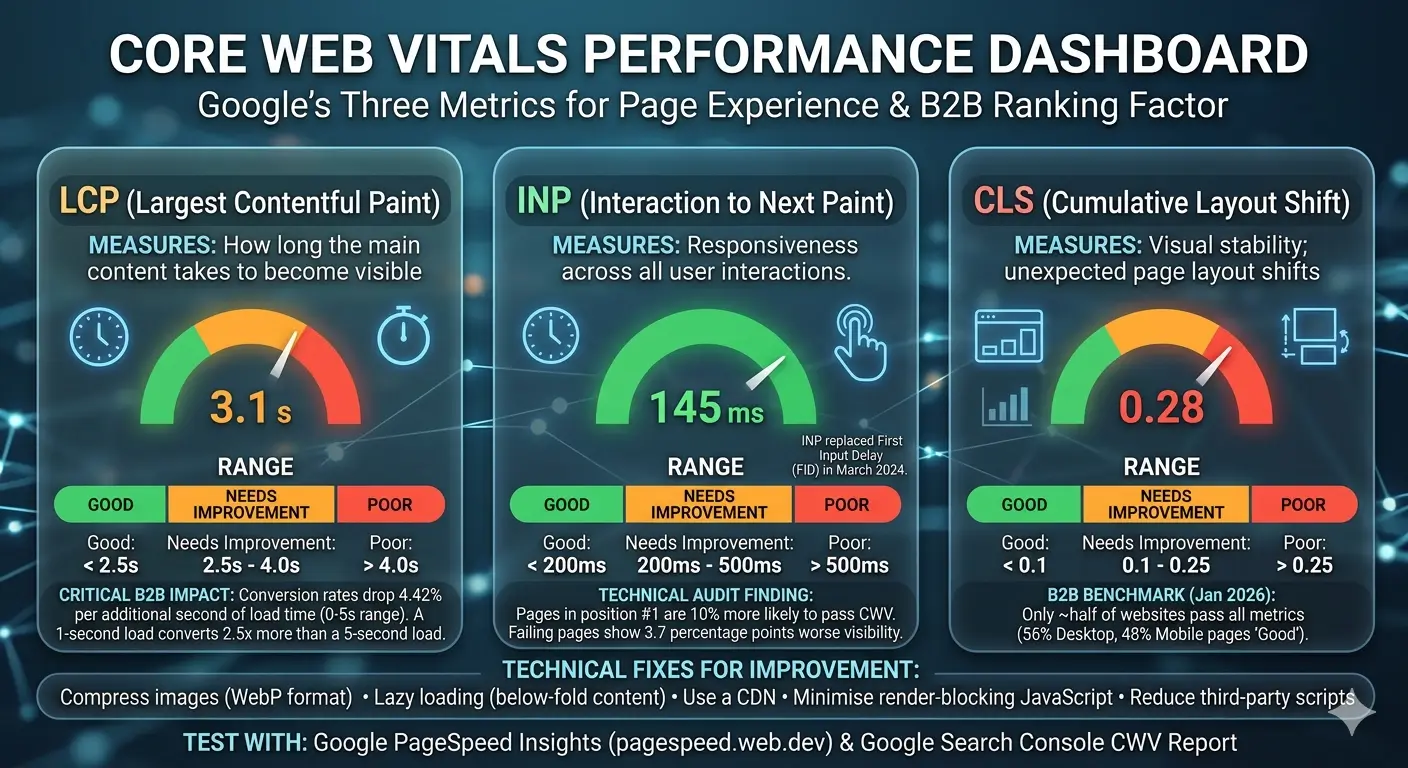
Page speed has a direct impact on conversions, not just rankings. Conversion rates drop 4.42% per additional second of load time in the zero-to-five second range. A page loading in one second converts 2.5 times more than a page loading in five seconds. For B2B companies where a single lead can be worth thousands of pounds or dollars, these numbers have real commercial weight.
How to Improve Core Web Vitals
- Compress images and use WebP format
- Implement lazy loading for below-fold content
- Use a CDN (content delivery network) to serve assets from geographically closer servers
- Minimise render-blocking JavaScript by deferring non-critical scripts
- Reduce third-party scripts: analytics pixels, widgets, and chat tools add load time
- Target a server response time (Time to First Byte) under 200 milliseconds
Use Google PageSpeed Insights at pagespeed.web.dev to test individual pages and identify specific issues. Google Search Console's Core Web Vitals report gives you site-wide data grouped by URL category, which is useful for prioritising fixes on large sites.
Mobile-First Indexing
Google completed its transition to mobile-first indexing in July 2024. This means Google now uses the mobile version of your website for indexing and ranking all pages. There is no longer a separate mobile index.
For B2B specifically, desktop still accounts for around 68% of traffic during business hours. But over 60% of B2B buyers say mobile played a significant role in their purchase journey. Mobile matters even in B2B, and it is now the version of your site that determines your rankings.
Requirements for Mobile-First Compatibility
- Use responsive design (Google's recommended approach over separate mobile URLs)
- Ensure mobile and desktop versions carry identical primary content
- Apply the same robots meta tags to both versions
- Do not lazy-load primary content that requires user interaction to appear
- Implement identical structured data on mobile and desktop
Check your mobile performance using Google Search Console's Mobile Usability report. It flags issues like text too small to read, clickable elements too close together, and content wider than the screen.
Structured Data for B2B
Structured data is code added to your pages that tells search engines not just what your content says, but what it means. It is implemented in JSON-LD format and uses the Schema.org vocabulary. Rich snippets generated by structured data increase click-through rates by 30 to 35%. Yet fewer than 40% of websites use structured data at all.
The value of structured data is expanding. Research shows that schema updates deliver a 22% median citation lift in AI search results from tools like ChatGPT and Perplexity. As AI-driven search accounts for a growing share of B2B research queries, structured data has become the bridge between your content and AI citation. Websites with attribute-rich schema are cited more often in AI-generated answers.
Schema Types Most Relevant to B2B
- Article: for blog posts and guides. Surfaces author credentials and publication dates in SERPs.
- FAQPage: for FAQ sections. Creates expanded SERP listings and improves voice search visibility.
- Organization: for company pages. Supports Knowledge Panel appearance and brand authority signals.
- HowTo: for tutorials and process guides. Enables step-by-step rich results and improves AI extraction.
- BreadcrumbList: for site navigation. Improves both crawlability and user experience.
One rule applies to all schema: the content in your structured data must match the visible content on the page. Discrepancies can trigger penalties. Validate your markup using Google's Rich Results Test before publishing.
How to Run a Technical SEO Audit for B2B
A technical SEO audit gives you a systematic view of your site's infrastructure against search engine requirements. Run one before launching any new content initiative, after a site migration, and at least once per quarter as routine maintenance.
A complete technical SEO audit covers five areas in order:
- Crawlability check. Verify that your robots.txt file is not blocking important pages. Review your XML sitemap for accuracy and submit it in Google Search Console. Run a crawl with Screaming Frog (the free tier covers 500 URLs) to surface crawl errors, broken links, and redirect chains.
- Indexing analysis. In Google Search Console, check the Coverage report. Compare the number of indexed pages against the actual number of pages on your site. Identify pages with "Excluded" or "Error" status and investigate the cause. Look for duplicate content issues and verify canonical tags are pointing to the correct URLs.
- Core Web Vitals assessment. Use the Core Web Vitals report in Google Search Console to see your site's LCP, INP, and CLS scores by URL group. Use PageSpeed Insights for page-level diagnosis. Prioritise LCP fixes first: they typically deliver the largest ranking improvement.
- Site architecture evaluation. Map your internal linking structure. Identify orphaned pages (no inbound internal links), pages buried more than three clicks from the homepage, and clusters of pages with no links between them. Use Screaming Frog to export a full link graph.
- Security and schema audit. Confirm that all pages serve over HTTPS and check for mixed content (secure pages loading insecure resources). Validate your structured data for all key page types using Google's Rich Results Test.
Free tools that cover the essentials: Google Search Console, Google PageSpeed Insights, Screaming Frog (free tier), and Chrome DevTools for JavaScript rendering analysis.
If your site uses a JavaScript framework like React or Vue, test your pages with JavaScript disabled in your browser. If primary content disappears, you have a rendering dependency that Googlebot may not resolve immediately. Google can render JavaScript, but the process adds latency to indexing. For content-critical pages, server-side rendering is more reliable.
Maintenance: What to Monitor Regularly
A technical audit is not a one-time project. Technical SEO degrades over time: pages get added without internal links, redirects accumulate, third-party scripts slow down load times, and structured data goes out of date.
Technical SEO Maintenance Schedule
- Weekly: Google Search Console for crawl errors, indexing drops, and Core Web Vitals alerts
- Monthly: Screaming Frog crawl to check for new broken links, redirect chains, and orphaned pages
- Quarterly: full technical audit across all five areas above
- After any site change: re-crawl affected sections and verify indexing in Search Console
Technical SEO improvements typically show measurable results within four to twelve weeks. Critical fixes like resolving indexing blocks can impact rankings within days. Core Web Vitals improvements require 28 days of data collection before scores update in Search Console. Site migrations can take three to six months to stabilise.
The compounding effect is the real reason to stay on top of it. A technically clean site crawls more efficiently, indexes more pages, and provides a better experience. Those advantages build on each other over time, and they do not disappear when a campaign ends.
Get In Touch
Can we help with your content and SEO needs? Have a question about our offers? Don't hesitate to get in touch, we'll reply right away!